I bought a new Steam controller and wanted to try it. I used it with Ship of Harkinian on Linux, launched it via Steam, and noticed gyro wasn’t detected. Below is how I got native gyro working for SoH.
Like any program, launching through Steam grants you the full capabilities of the controller except for native access to gyro. The solution is to emulate the mouse or joystick which is fine for programs that don’t support gyro natively but terrible for applications that do.
Ship of Harkinian is an SDL2 application. The new Steam Controller support is in SDL3’s HIDAPI Steam controller driver, where the controller is handled under the Triton driver. That means SoH can have a working motion-aim path while the controller support needed to feed it is sitting one SDL generation away.
The useful bridge here is sdl2-compat. It provides a libSDL2-2.0.so.0 that looks like SDL2 to the application, but forwards the calls into SDL3. SoH still thinks it is running against SDL2. Underneath that, SDL3 handles the controller and exposes the gyro and accelerometer.
No SoH patches were needed for this setup.
Example of the working gyro:
The problem
SoH already has motion aiming support. The issue is getting the controller’s gyro exposed through the API SoH is using.
The chain looks like this:
| |
Why not just use Steam Input?
Steam Input is a reasonable workaround for some games but you lose native gyro.
Steam Input can present a virtual controller or map gyro to mouse/stick input. That is useful, but it also adds another layer that can create input translation issues(think control stick deadzone, acceleration, etc). For SoH, I wanted the native controller path: buttons as controller buttons, gyro as gyro. Gyro emulating the control stick gives terrible results akin to playing on an N64 controller.
This is overkill if you only want basic gamepad input. It is mainly worth doing if you want the controller’s motion sensors visible to SDL.
Requirements
This was tested on Linux.
You need:
- A Linux system with normal build tools installed
- CMake
- Ninja or Make
- Git
- A recent SDL3 checkout with the Steam Controller
TritonHIDAPI driver(I used the master branch from 2026-05-16) - A current sdl2-compat checkout
- A Ship of Harkinian build that dynamically links
libSDL2-2.0.so.0(I used 9.2.3) - The new Steam Controller puck plugged in
- Steam must not be running
Check the puck with lsusb:
| |
For the puck I was targeting, I expected one of these IDs:
| |
Build SDL3 and sdl2-compat locally
I installed this into a private prefix under ~/.local so I did not have to replace the system SDL libraries.
| |
Build and install SDL3:
| |
Then build sdl2-compat against that SDL3 install:
| |
After that, $PREFIX/lib should contain the SDL2 compatibility library and the real SDL3 backend:
| |
Run Ship of Harkinian with the SDL2 shim
The runtime part is simple: put the local SDL stack ahead of the system libraries.
If you want, you can use a wrapper script to launch it:
| |
Adjust SOH_DIR and the executable name for your install. If you are running an extracted build instead of an AppImage, point it at that binary instead.
For AppImages, LD_LIBRARY_PATH still works because the dynamic loader sees it before resolving the executable’s shared libraries. If you extracted the AppImage manually, the same idea applies.
With the controller connected, the window should show the controller as a Steam Controller the same as when launching from Steam.
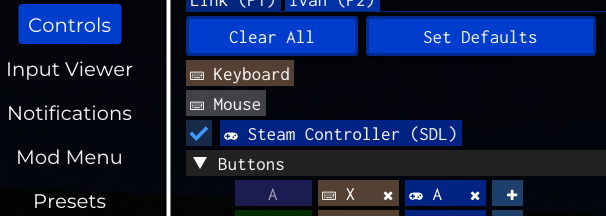
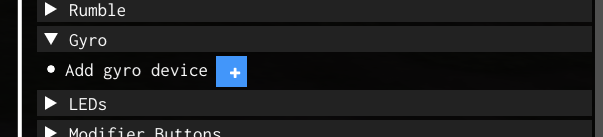
Enable gyro in SoH
Launch SoH.
- Open the controller settings.
- Add a gyro device if it wasn’t automatically added.
The controller should be instantly added.
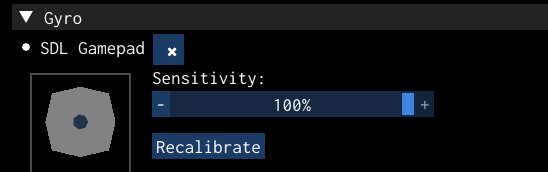
How this works
SoH asks SDL2 whether the controller has a gyro sensor. In SDL2 terms, that is SDL_GameControllerHasSensor(controller, SDL_SENSOR_GYRO). If the sensor exists, SoH can enable it with SDL_GameControllerSetSensorEnabled.
With sdl2-compat in the middle, those calls are translated into the SDL3 gamepad sensor path. SDL3 then talks to the controller through its HIDAPI Steam Controller driver.
The important part is that SoH does not need to know about the new controller. It only needs SDL to expose a controller with a gyro.
Troubleshooting
The controller shows up as a generic gamepad
Your SDL3 build is probably too old, or it did not build the Steam/Triton HIDAPI driver.
A quick check:
| |
If that shows nothing, rebuild SDL3 from a newer checkout.
SoH still loads the system SDL2
Check what is actually being loaded:
| |
If your local libSDL2-2.0.so.0 is not listed, the dynamic loader is not using your shim.
Common causes:
- SoH has a bundled SDL2 next to the binary(which I haven’t seen in the appimage)
- The binary has an RPATH or RUNPATH pointing at bundled libraries
- A launcher prepends its own runtime libraries
LD_LIBRARY_PATHis being overwritten in a wrapper script
If you lauch with Steam closed and without any launcher, none of these should apply.
Touchpad clicks aren’t recognized
The new Steam Controller’s touch pads aren’t currently supported in SDL3, as far as I’m aware. You lose the touch pads in exchange for gyro. It looks like they’re exposed as touch pads, because they are, and SoH doesn’t know how to translate that to button presses.
Limitations
This is Linux-only.
This also depends on SoH dynamically loading SDL2 in a way that can be overridden. If your build is statically linked or aggressively bundles its own SDL2, this approach needs adjustment.
The gyro path works because it fits the existing SDL sensor API. More controller-specific inputs are less clean, especially touchpad clicks and touch sensors that do not work.
Quick version
Build SDL3 and sdl2-compat into a local prefix:
| |
Run SoH with the shim first in the library path:
| |